Should You Move Your WordPress Site to HubSpot?

What Does a HubSpot Website Actually Cost?
You need a website budget for next year. One proposal is $24,000. Another is $65,000. Both say “HubSpot website,” and neither number includes everything your team expects.
That makes comparison difficult before you've even looked at the designs.
HubSpot website cost starts with two separate bills: the software subscription and the project to build or improve your site. Ongoing support can add a third budget line after launch.
The useful question is what your business needs each of those bills to cover.
Summary
- Separate HubSpot subscription fees from design, development, migration, and ongoing support.
- A simple theme-based site and a complex marketing platform can have very different budgets.
- In the planning ranges below, a typical rebuild is $15,000–$40,000; a broader enterprise marketing-site project is $60,000–$125,000.
- These are scope-based planning ranges, not minimum HubSpot costs or a survey of every agency's pricing.
- You may need targeted repairs, a CMS move, or a phased project instead of a full redesign.
The separate costs
Your HubSpot subscription pays for access to the platform. The website capabilities sit within Content Hub, formerly called CMS Hub. Your existing Marketing Hub agreement doesn't automatically answer which website features you have.
Check HubSpot's current Content Hub pricing or ask us to facilitate. A simple site may fit a lower tier. More advanced requirements can change the subscription, seat, and add-on costs.
Your project fee pays for the website your team will use. Depending on the scope, that can include research, messaging, design, templates, reusable modules, content migration, integrations, testing, and training.
What B2B teams actually pay
The following 2026 planning ranges cover substantial B2B marketing-site work with a US or remote partner. They are project fees, excluding HubSpot licenses, and should be narrowed through scoping. They do not describe every small website or imply that every team needs this much work.
| What you need | Initial planning range |
|---|---|
| A substantial diagnostic engagement for performance, indexation, or broken templates | $2,500–$5,000 |
| Messaging and a homepage plan | $5,000–$7,500 |
| A targeted rebuild covering the homepage and 8–15 key templates | $15,000–$20,000 |
| A full 30–80 page marketing-site project with a module library and CRM-related implementation | $25,000–$40,000 |
| A complex build involving portals, calculators, multilingual content, or substantial dynamic functionality | $50,000–$75,000+ |
| A one-to-one CMS migration preserving the design | Often 60–80% of a comparable full redesign |
| Substantial ongoing development and optimization support | $2,000–$5,000+ per month |
These are alternative levels of work, not a list to add together. A smaller audit, a limited development scope, or a modest support arrangement can fall below these ranges. Confirm whether a diagnostic fee includes implementation; don't assume it does.
A $12,000 theme-based website can be a sensible purchase when your content is ready, the layout needs are straightforward, and your team can work within the theme. A larger fee needs to be explained by larger responsibilities or more complex requirements.
Publishing weekly doesn't automatically require a custom build. A well-chosen theme can support regular publishing. The problem starts when the theme can't support the layouts or functionality your campaigns need and each update becomes another workaround.
Why one quote is $24,000 and another is $55,000
Page count gives you a starting point. It doesn't tell you how much of the site is genuinely different.
Fifty pages using a few repeatable layouts may require less development than fifteen pages with unique interactions, data sources, and approval requirements. Ask each partner to identify the templates and features driving the estimate.
The biggest variables usually include:
- Design responsibility. Are you supplying approved designs, adapting a purchased theme, or asking the partner to develop the design direction?
- Content responsibility. Is copy ready, or does the project include messaging, writing, interviews, and stakeholder review?
- Functional complexity. Filtering, calculators, gated areas, integrations, and dynamic content need behavior defined and tested.
- Migration scope. A large blog archive, downloads, old URLs, and historical content can require significant work beyond the visible sitemap.
- Acceptance requirements. Specific accessibility or performance targets need an agreed testing method, scope, and responsibility for third-party tools.
Combining a migration with a redesign also adds decisions. Preserving a working site removes some design work, but it doesn't remove the need to rebuild its functionality or protect its search entry points.
Our Navigator Business Solutions rebuild illustrates the difference between a page refresh and a broader project. We rebuilt 56 pages with nine unique page designs, a blog template, and a 150+ module library. The work also addressed performance and legacy content management issues; 115 mobile URLs moved from Poor to Good in Search Console Core Web Vitals.
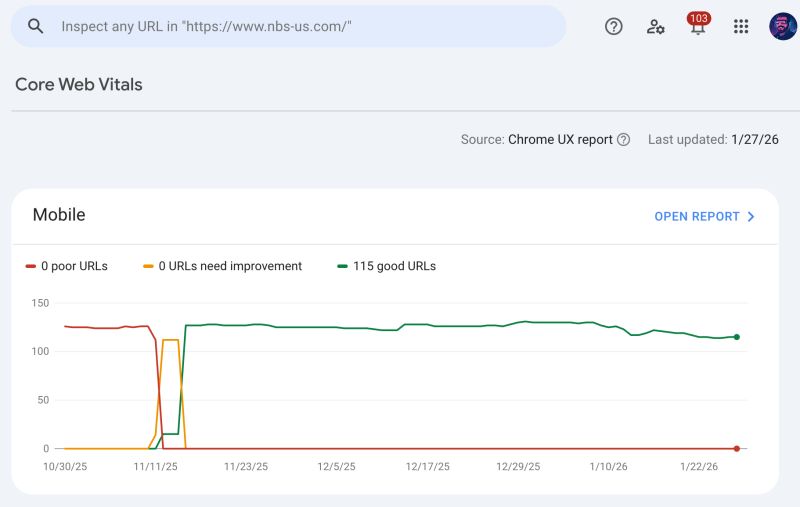
That case study demonstrates scope and outcomes. It is not a disclosure of the client's project fee or evidence that every site needs the same build.
What should already be in the proposal
An inexpensive quote becomes expensive when essential work appears later as an addition.
You don't need every possible feature included. You do need an explicit answer about the work required to launch successfully.
Before approving a HubSpot website design and development project, check for:
- Copy ownership and approval. Who writes each page, and when does copy become final? Approving homepage messaging before detailed design reduces avoidable revisions.
- Mobile behavior. Which layouts and interactions will be designed and tested for phones? “Responsive” should cover more than columns stacking.
- Editing capabilities and training. What can your team change, build, or reuse? Ask to test a representative page in the actual page editor.
- Migration and SEO responsibilities. Identify who handles metadata, redirects, internal links, canonical tags, relevant structured data, and indexability checks.
- Forms and measurement. Include form routing, required CRM connections, analytics, and a process for verifying conversions after launch.
- Launch and follow-up. Specify Search Console checks, bug support, handover materials, and what counts as a new request.
Ask about exclusions just as directly. Copywriting, photography, paid assets, custom integrations, and ongoing SEO may sit outside the project. A clear exclusion is manageable. An assumption you discover during launch week is harder to absorb.
You might not need a new site
If the current site still communicates the right message and supports your campaigns, start with the specific problem.
Fix the site when the issue is limited: a slow hero, broken form, poor mobile navigation, or an underperforming landing page. Identify the cause before replacing the entire system.
Move the site when the design and content work but the CMS makes maintenance difficult. Preserving the existing experience can contain both cost and disruption.
Rebuild the site when the problems run through the templates, editing experience, content structure, or design. Repeatedly patching a system your team can't use may cost more over time.
These decisions can overlap. You may repair lead capture now and schedule a broader rebuild later. The proposal should explain why its recommended scope is necessary for the outcome you need.
Can we start smaller?
Yes. A useful first phase could address the homepage and the pages that support your most important sales conversations, then extend the approved system across the remaining sitemap.
Phasing works best when the first phase includes a plan for the rest. Shared navigation, styles, modules, and content relationships should support later pages without needing to be rebuilt again.
Bringing approved Figma designs can also reduce design work. The development team still needs to translate them into editable modules, define missing mobile behavior, and test realistic content. A polished desktop mockup is not a finished website specification.
A marketplace theme offers another starting point. Compare its actual modules against your planned pages before committing. Budget for necessary customization, while keeping the parts that already work. A rewrite should have a reason; it shouldn't be an automatic surcharge for choosing a theme.
When reviewing a phased quote, ask what is reusable in phase two, what remains unfinished after phase one, and whether the later work is estimated separately. That gives you a credible first-year budget without pretending the remainder will be free.
HubSpot website cost FAQ
Is HubSpot's CMS free?
HubSpot offers free website tools and paid Content Hub tiers. Whether the free tools fit depends on your requirements. Software access also doesn't include someone planning, designing, building, and maintaining your site.
Why can HubSpot look more expensive than WordPress over three years?
WordPress software is free, while the complete setup can include hosting, paid plugins, maintenance, developer support, and integrations. Compare those actual costs with HubSpot's subscription and support needs. HubSpot won't always be cheaper and a working WordPress setup may remain the better value.
Does buying a theme mean we can skip development?
Possibly, for a straightforward site your team can assemble itself. Custom layouts, integrations, migration, and specialized functionality still require work. Test the theme against your requirements before treating its purchase price as the build budget.
Can we split the project across budget periods?
Yes, if each phase has a usable outcome and the underlying structure supports the later work. Agree on scope, dependencies, and handoffs before starting so you don't pay to redo the first phase.
Is ongoing support required?
Your team may handle routine publishing after training. Budget outside help for new functionality, technical problems, or improvements you don't have capacity to manage internally. The right amount depends on planned work, not simply owning a HubSpot site.
Get a number that fits what you need to build
Tell us what you're trying to ship this year, what already works, and what keeps getting in the way. We'll help you decide whether the right investment is a fix, a move, or a rebuild—and put a scope and cost against that decision.

Josh is the owner of Inbound Design Partners and a HubSpot & WordPress expert. With years of experience solving complex web challenges, he helps businesses build smarter, more effective websites. Have a question about making your website work better? Josh has the answers.