

Move Smartly: HubSpot Website Rebuild


TL;DR (Quick Summary)
We rebuilt Navigator Business Solutions’ website in HubSpot with a custom design and a heavily customized Sprocket Rocket Pro theme—prioritizing Core Web Vitals performance and a better page editing experience for their team.
The result:
-
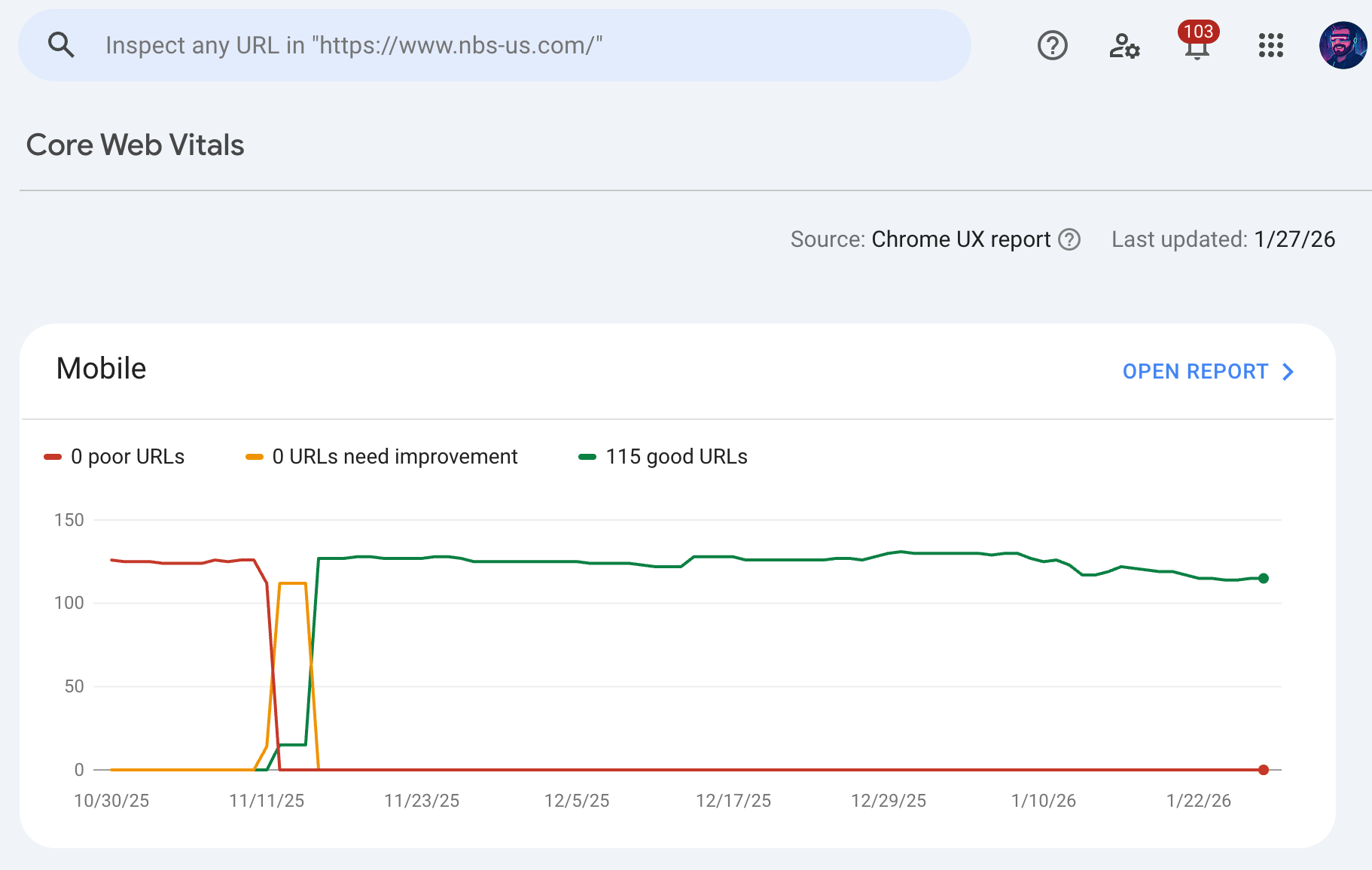
All 115 mobile URLs moved from “Poor” → “Good” in Google Search Console
-
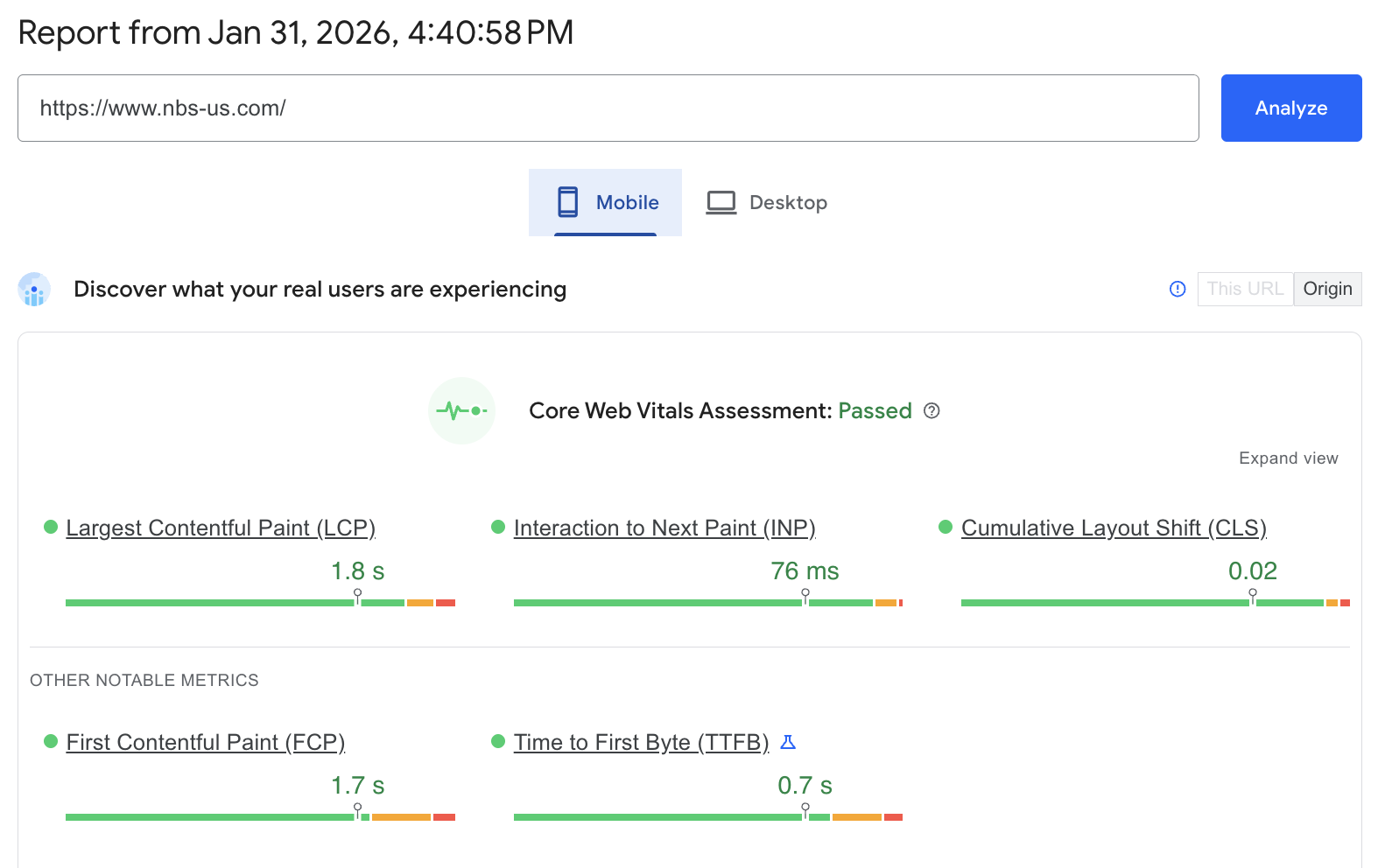
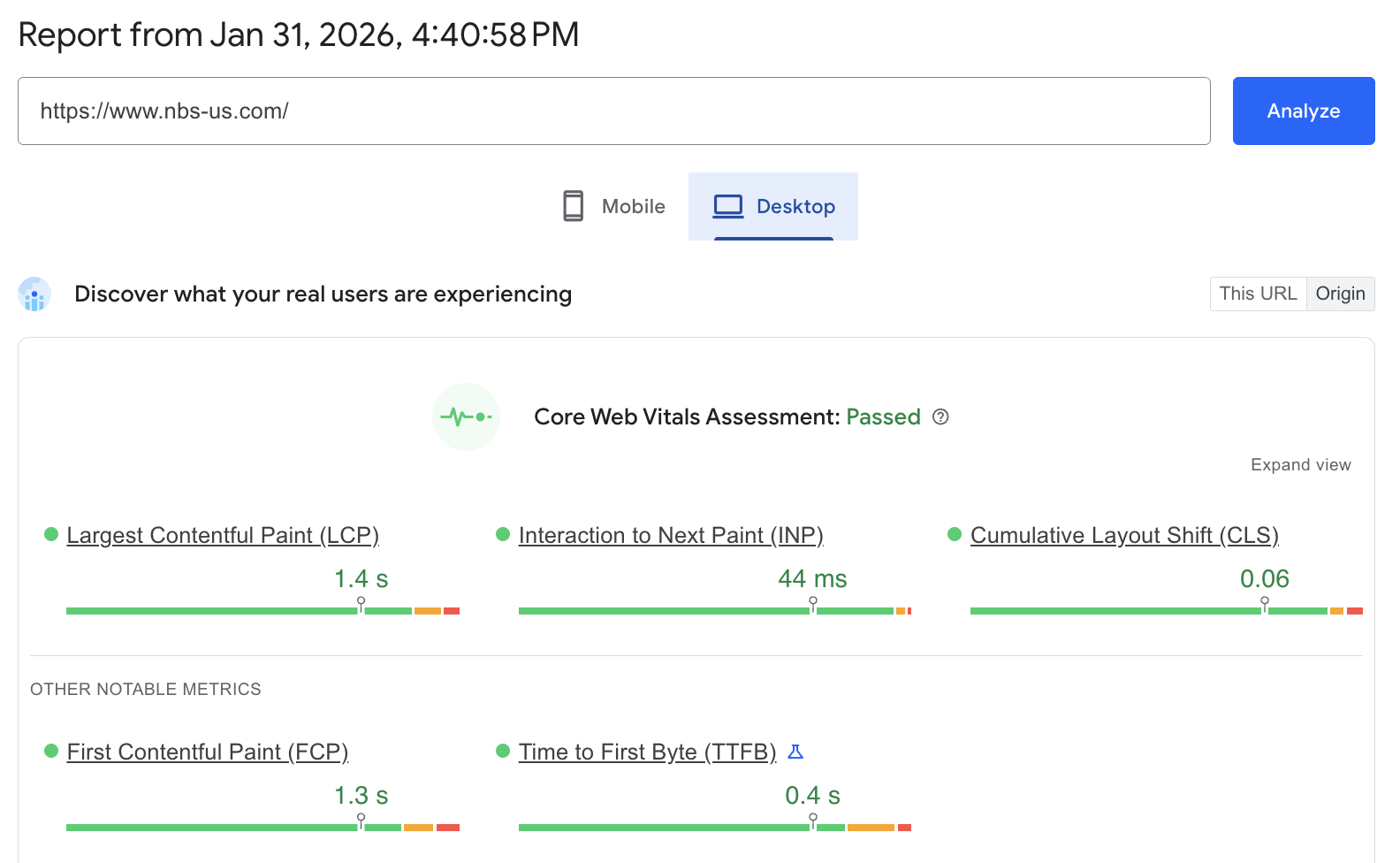
Core Web Vitals now pass on both desktop and mobile
-
Faster real-user load times, improved interaction metrics, and a cleaner, easier-to-manage HubSpot setup
This was a ground-up rebuild designed to be fast, scalable, and easy to maintain long term.
Project Details
Navigator Business Solutions is a long-standing SAP partner with a large, content-heavy site spanning services, resources, videos, and blogs. Their previous setup made it hard to maintain performance and even harder for editors to confidently update pages without breaking layouts or regressions.
The primary goals of this rebuild were clear:
-
Fix real-user performance issues (Core Web Vitals)
-
Simplify and modernize the HubSpot editing experience
-
Clean up years of technical debt
-
Create a future-proof content and module library
What We Built in HubSpot
⚡ Performance-First HubSpot Rebuild
-
Rebuilt 56 site pages using customized HubSpot theme architecture
-
Optimized templates for LCP, INP, CLS, and TTFB
-
Optimized images and videos for the web (format, sizing, loading behavior)
-
Cleaned up legacy markup and unnecessary scripts
Before: 115 mobile URLs flagged as Poor
After: 115 mobile URLs flagged as Good ✅
🧩 Custom Theme + Module System
-
Installed Sprocket Rocket Pro and customized it to match our designs
-
Created:
-
9 unique page designs
-
1 blog template
-
Custom mega menu
-
-
Delivered a 150+ module library for flexible, no-code page building
-
Built layouts that empower marketers—not developers—to make updates safely
🧠 Editor Enablement & Documentation
-
Provided training for Navigator’s internal team
-
Created a custom theme documentation page inside HubSpot
-
Designed the system so future pages can be built and maintained in-house without developer support
🧼 Technical Cleanup & SEO Foundations
-
Audited and removed unnecessary third-party scripts
-
Centralized tracking via Google Tag Manager
-
Archived and unpublished outdated pages
-
Implemented proper 301 redirects
-
Cleaned up ~10 legacy blog instances and redirected as needed
🔗 Structured, Dynamic Content with HubDB
-
Built a dynamic HubDB table for product and solution videos
-
Migrated existing video content into a structured, reusable system
-
Enabled scalable video management without duplicating content across pages
🧠 Schema & AI-Ready Markup
Implemented structured data across the site, including:
-
Organization
-
Website
-
WebPage
-
ItemList
-
VideoObject
-
FAQPage
This improves crawlability, eligibility for rich results, and AI-driven discovery.
Performance Results After Launch
📈 Real-User Performance (CrUX / CWV)
-
Core Web Vitals: PASSED on desktop and mobile
-
PageSpeed Insights now reports all CWV metrics in the green
-
Google Search Console confirms:
-
0 poor URLs
-
0 URLs needing improvement
-
All URLs rated “Good”
-
🗣️ Qualitative Feedback
Navigator has reported:
-
Noticeably faster load times
-
Positive feedback from site users
-
A smoother internal editing experience with fewer workarounds
Why Core Web Vitals + Editor Experience Matter
This rebuild wasn’t just a visual refresh—it was a structural reset.
Navigator now has:
-
A fast, CWV-compliant site built for real users
-
A scalable HubSpot theme they can grow with
-
Clean analytics, cleaner SEO, and cleaner content management
No more fighting the CMS. No more performance surprises.
Tech stack: HubSpot CMS, Sprocket Rocket Pro theme, HubDB, Google Tag Manager, JSON-LD schema
👉 See the live site: https://www.nbs-us.com
👉 Thinking about a performance-focused HubSpot rebuild? Contact Inbound Design Partners

Josh is the owner of Inbound Design Partners and a HubSpot & WordPress expert. With years of experience solving complex web challenges, he helps businesses build smarter, more effective websites. Have a question about making your website work better? Josh has the answers.